Sharing mindmaps with Markdown
I use XMind as my main thinking tool. When I need to structure ideas, plan a project, or just get things out of my head, I open XMind and start branching.
But sharing edits in mind maps is not trivial. XMind has an online sharing model but I’ve stayed away from it: I like my files local, versioned, and under my control. So for a long time, mind maps were a solo activity for me.
Turns out there’s a nice bridge: Markdown.
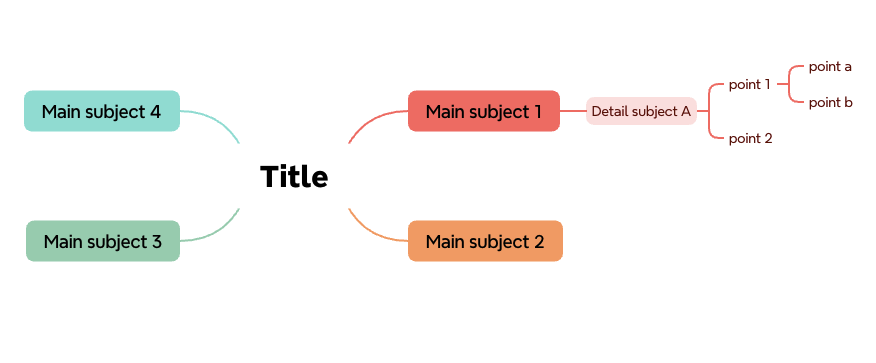
The workflow
XMind (paid version) can export a mind map as Markdown. And the good news is that it’s non-destructive: you can import the Markdown back into XMind and keep editing visually. Round-trip works.
So my workflow is simple: I edit in XMind for the mind flow, the part where I’m actually thinking and reorganizing ideas. When I’m happy with a snapshot, I export to Markdown and push it to a git repo. Collaborators can read it, comment on it, or even edit the Markdown directly. When they do, I import the modified Markdown back into XMind and continue from there.
The Markdown structure
The format is straightforward. Headings map to top-level branches, sub-headings to child branches, and bullet points to leaves:
# Title

## Main subject 1

### Detail subject A

- point 1

    - point a

    - point b

- point 2

## Main subject 2

## Main subject 3

## Main subject 4
That’s it. Simple enough that anyone can read and edit it without knowing anything about mind maps.
What your collaborators can use
People I work with don’t all have XMind, and that’s fine. They have options:
- XMind (paid): import the Markdown, get the full visual experience, edit, export back. This is the smoothest path but it costs money.
- Obsidian with the mindmap-nextgen plugin: renders the Markdown as a mind map. Free and decent for viewing.
- VSCode: works fine for reading and editing the Markdown as text. There are visualization plugins but most of them seem old and poorly maintained. For quick edits though, plain Markdown in VSCode is perfectly workable.
Why I prefer XMind over Obsidian for mind mapping
I tried using Obsidian with the mindmap plugin as my primary tool. A few things drove me back to XMind.
First, Obsidian’s mindmap rendering only expands to the right of the central node. I could not find any option to spread branches left and right like a proper mind map. This wastes half the screen and makes everything smaller than it needs to be. When you’re working on a large mind map, that matters.
Second, editing in Obsidian is a pain in the ass. You can’t just grab a branch and move it around visually. You have to switch to the Markdown editor, cut and paste text where it should land (which can be harder to find). That back-and-forth defeats the whole purpose of mind mapping: thinking visually, reorganizing freely, without friction.
Third, I need very capable export options (PNG, SVG) and I’m picking on my mindmap style (color etc).
XMind does these things well, and the Markdown export gives me the sharing layer I was missing. Happy thinking.


Comments